
 NewProjects
Digital Platform
NPScaff: Scaffold requests, approvals and field tracking
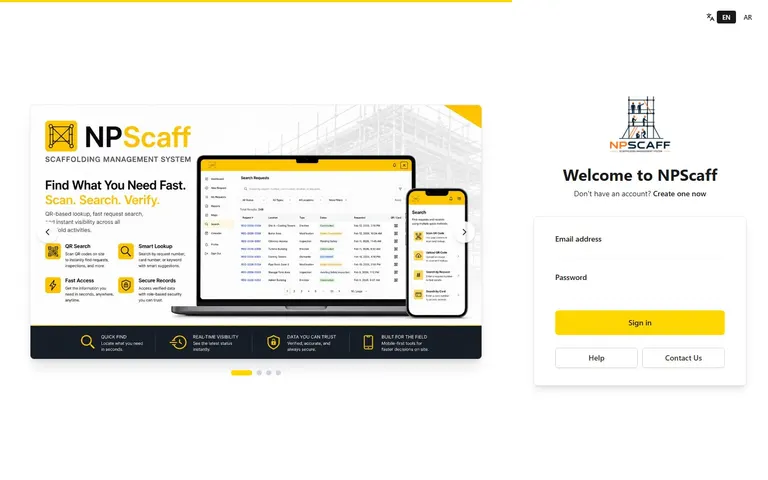
Manage the scaffold request lifecycle from client submission and approvals through erection, inspection records and dismantling.
Use case and features
For client, contractor, safety, administrator and read-only reporting roles.
- Requests tied to an assigned organization, purchase order, location, dimensions and map point
- Contractor acceptance/rejection, safety review, erection completion and final inspection stages
- Dismantling requests and completion, with comments and traceable request history
- Field tags, QR scanning/upload and search by request or card number
- Site maps, with the active map version controlled by administrators
- Filtered request tables, PO progress and analytics with XLSX, CSV, PDF and print exports
- Role-scoped access for clients, contractors, safety, administrators and read-only viewers
From the official user guide
The official help guide explains the app map, full request lifecycle, field tags, QR search, map versions, reporting/export options and responsibilities for each role. Use it for the current application steps and deployment-specific limitations.
- Client request, contractor review and safety stages
- Erection records, field tags and dismantling
- Map versions, QR scanning and request/card search
- Reports, PO progress, exports and user roles
Usage workflow
- The client creates a request under the assigned organization and PO, adding location, scope, dimensions and a map point.
- The contractor reviews the request; safety reviews the relevant approval stage before erection proceeds in the application workflow.
- The contractor records erection completion, dimensions, photos and the field card number.
- Safety records the final inspection stage and the request moves to the Constructed state.
- The client can request dismantling; the contractor completes that stage and the record closes as Dismantled. Rejected requests retain comments and history.
- Authorized users follow maps, QR-linked records and filtered reports within their assigned data scope.
Example workflow
A client requests access scaffolding for a work area under a purchase order. The contractor and safety team follow their assigned stages, attach completion records and use the field tag to find the request. A later dismantling request closes the same traceable lifecycle.
Account and access
The help guide is public; operational records require authentication and role/organization access. Administrators manage organizations, POs, users and map rollout. Viewer access is read-only. The guide describes inspection due dates as derived until the formal inspection module is enabled, and WhatsApp delivery as requiring backend configuration.
This is a summary of the documented application workflow, not independent verification of every account or module. A derived tag or software status does not replace the site's competent inspections, approved design, permits or release procedures.
Frequently asked questions
What does NPScaff manage?
It manages scaffold requests and their operational lifecycle, including approvals, erection records, field identification, maps, reporting and dismantling, with role-based responsibilities.
Are tag dates and WhatsApp messages fully automatic?
Do not assume so. The help guide says inspection due dates are derived until a formal module is enabled, and WhatsApp UI still needs backend configuration.
Does a software status certify scaffold safety?
No. Treat the application's status as a record of its workflow, while following the site's competent inspection, handover and permission-to-use controls.
Launch NPScaffLifting and scaffold guidesSupport and contact
Scaffold request management across site teams
NPScaff coordinates a scaffold request between the client, contractor and safety team. The documented lifecycle records approvals, erection completion, final inspection stages and dismantling against the same request, with comments and history retained.
A request is connected to an organization, purchase order and location. Field cards, QR search and maps help teams find its record, while reports and PO-progress views show the data permitted for each role. The active map version and administrative settings determine the available views.
Read the official help guide for the role responsibilities and current workflow. Site inspection, approved designs and permission to use scaffolding remain operational responsibilities; a software status is not an independent safety certificate.
Direct Contact
Egypt: +20 109 332 0000