
 NewProjects
Digital Platform
NPCrane: Crane calculation, lift planning and reports
Prepare a lifting study from load and site inputs through crane selection, diagrams, reports and controlled sharing.
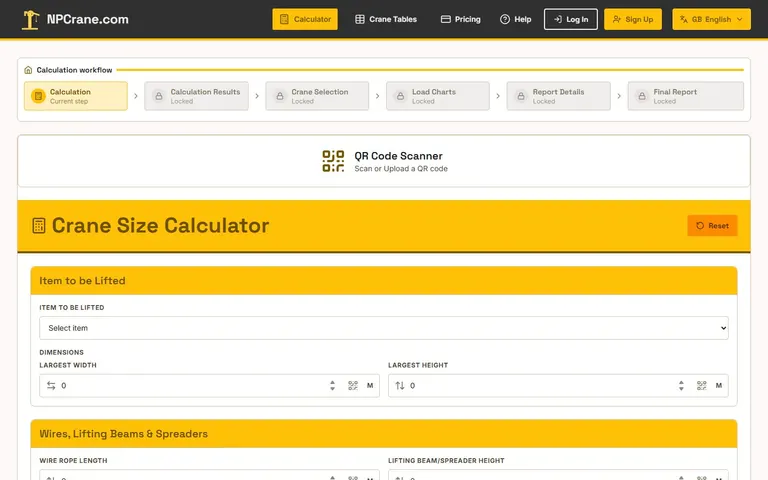
Use case and features
For lifting planners, site engineers and equipment coordinators.
- Load dimensions, rigging height/weight, radius, placement height and obstruction inputs
- Top-view site layout with crane, pick-up, set-down and obstacle elements
- Side-view lifting diagrams and crane/load-chart selection
- Report editing with project information, logos, photos and planning records
- Planning aids covering ground/mat pressure, sling tension, center of gravity and lifting beams
- Saved calculation management and report sharing through QR codes or links, subject to access settings
From the official user guide
The complete guide explains the calculator, site-layout designer, diagrams, load charts, dashboard, report editing and sharing. It also covers planning-check assumptions and troubleshooting; follow the live guide for detailed screen-by-screen instructions.
- Calculator inputs and results
- Site layout and lifting diagrams
- Reports, engineering-review records and export options
- Saved calculations, QR sharing and troubleshooting
Usage workflow
- Read the user guide and sign in for account-only functions such as the dashboard and saved records.
- Enter verified load, lifting-accessory and site information in the calculator, including obstructions where relevant.
- Review calculation results and compare the required configuration with the applicable manufacturer load chart.
- Prepare the site layout, lift diagram and project/report information; document the assumptions requiring technical review.
- Review the final report, then save, export or share it using the functions and visibility settings available to your account.
Example workflow
For an AHU placement study, assemble the verified equipment and site data, compare a crane configuration, show the intended positions in the layout and document the study in a report for competent review. This is an application workflow example, not an executable lifting instruction.
Account and access
The user guide is publicly readable. Dashboard, saved records and other account-only actions require sign-in; available report, export and sharing options depend on current account access. Confirm pricing inside NPCrane rather than relying on historical guide quotas.
These capabilities are summarized from NPCrane's public user guide, not an independent validation of its engineering engine. Calculations, drawings and reports support planning; they do not constitute an approved lift or replace manufacturer data, site verification and competent-person review.
Frequently asked questions
Is NPCrane only a crane-size calculator?
No. Its guide also describes site layout, lifting diagrams, load charts, report preparation, saved calculations and sharing. Account access controls which functions you can use.
Does the generated report approve a lifting operation?
No. The responsible competent people must review the project inputs, manufacturer limits, site conditions, rigging and required approvals before execution.
Where are the detailed instructions?
Use the official user-guide link on this page. It contains the full application workflow and troubleshooting topics; this page provides only a summary.
Launch NPCraneLifting and scaffold guidesSupport and contact
From crane calculator to a documented lifting study
A crane calculator is one part of lifting-plan preparation. NPCrane's guide connects load and site inputs with crane selection, layouts, diagrams and report documentation, so teams can keep the study and its supporting information together.
The guide also covers saved calculations, report editing, QR/link sharing and planning aids for rigging, ground/mat pressure, center of gravity and lifting beams. Confirm the options enabled for your account, and read the full guide for detailed screen instructions.
Keep manufacturer references and verified project data with the study. Software output is not an engineering approval; a competent review of the job remains necessary. This product summary does not provide calculation rules or executable lifting instructions.
Direct Contact
Egypt: +20 109 332 0000